- Before you start: the right application, and the right login
- Tab 1, Firm Information
- Tab 2, Application Details: your role, your forms, your method
- Tab 3, Software Packages: only for software developers
- Tab 4, Authorized Users: who has to be on the application
- Tabs 5 to 7: comments, summary and signing
- After you submit: the wait, the TCC and what it unlocks
- Questions people ask
Before you start: the right application, and the right login
IRS application screens; Publication 5903 (Rev. 12-2024). The Software Packages tab applies only to software developers.
A FIRE TCC does not work in IRIS. If your firm’s only application is the one marked IR-TCC, you need a new IRIS application, and the wait is counted in weeks.
The IRS has two TCC applications and they sit side by side in the same list. The older one, shown as IR-TCC, is for the FIRE system. The one you want is shown as IRIS-TCC. A firm that has filed through FIRE for years will see a completed IR-TCC application and may assume it is covered. It is not: a FIRE TCC cannot be used in IRIS, and FIRE itself is closing (see FIRE to IRIS).
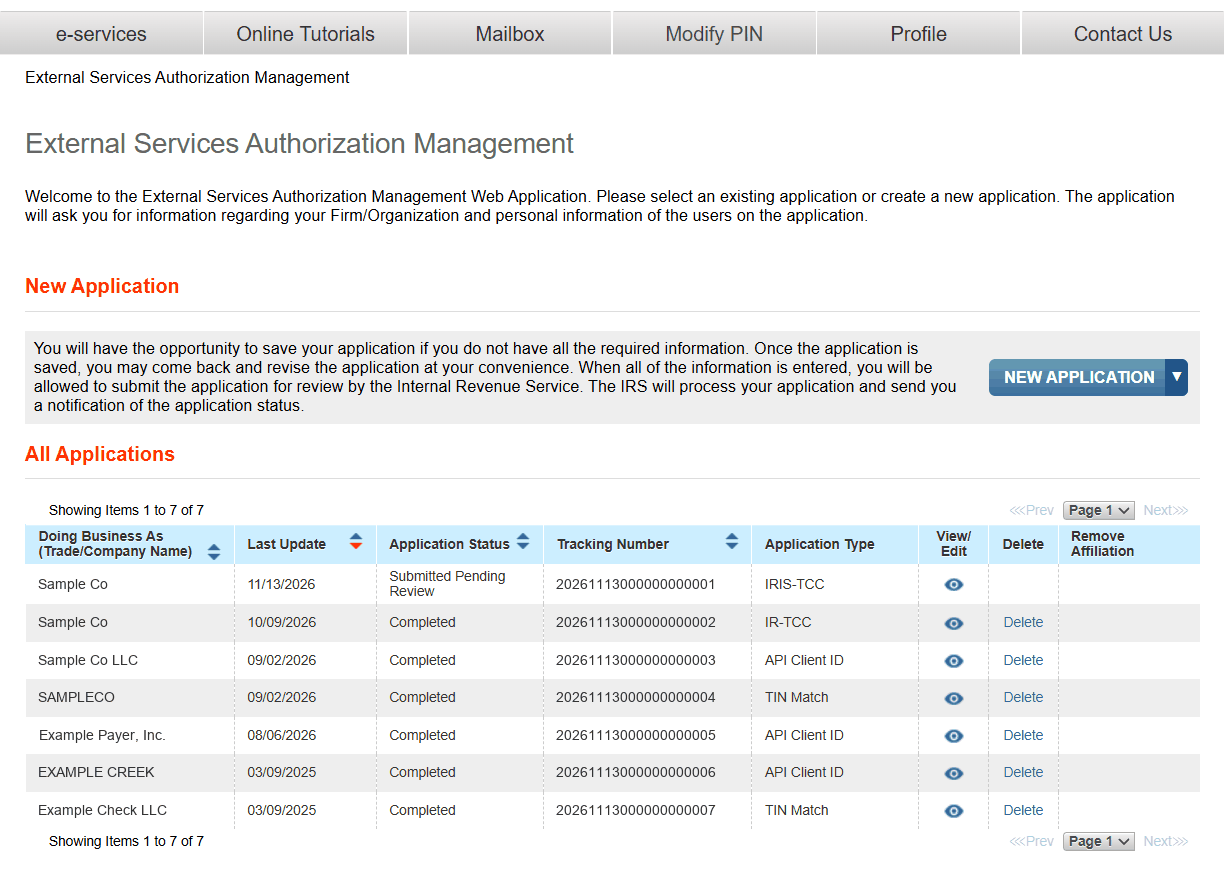
The page says you do not have to finish in one sitting: “You will have the opportunity to save your application if you do not have all the required information.”
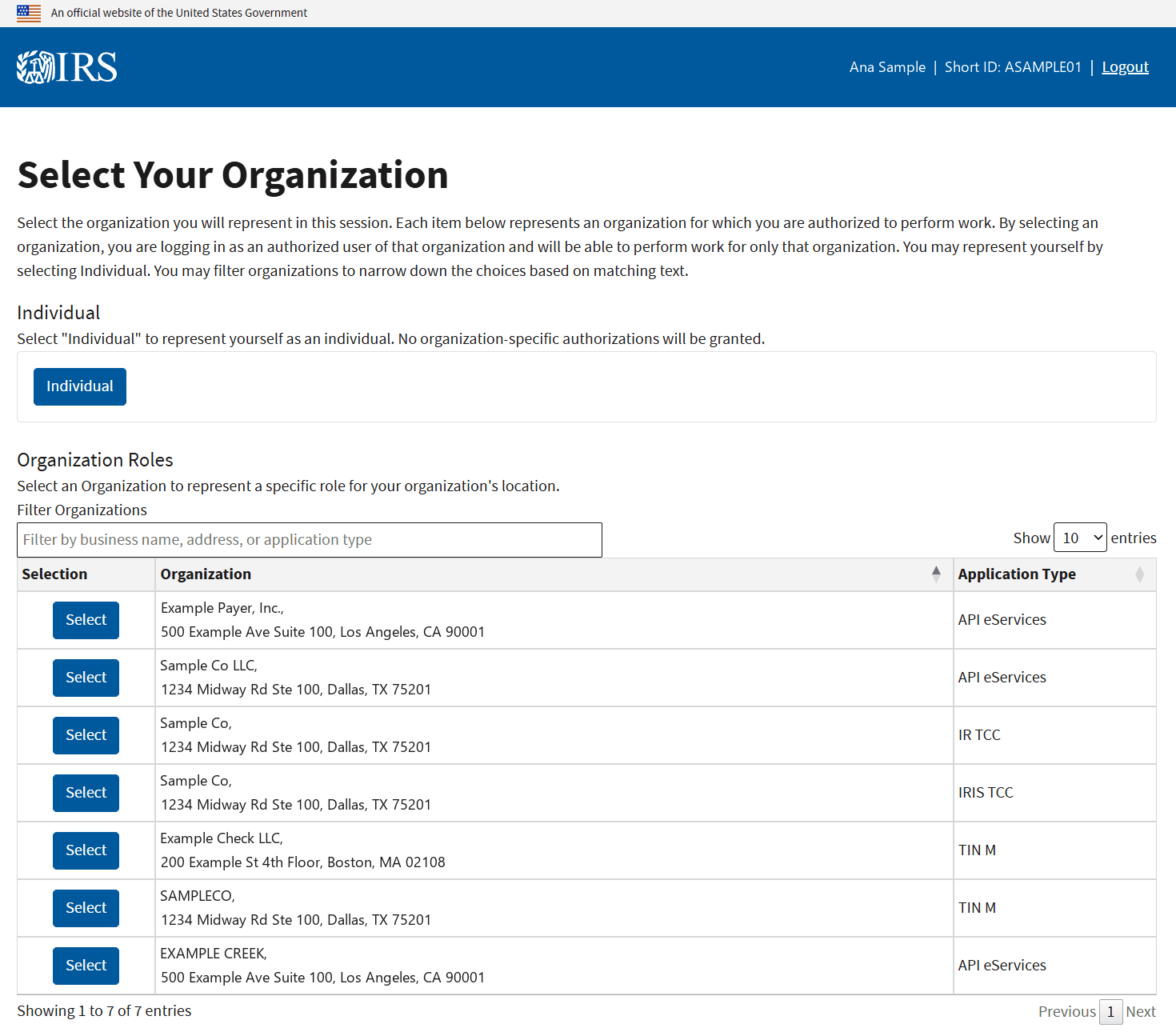
Before that list, the IRS asks which organization you are acting for. Until your IRIS application is completed, your firm has no IRIS entry to pick, so the IRS tutorial tells Responsible Officials to choose Individual (Publication 5903 (Rev. 12-2024), Part 2).
Have these ready. The tutorial lists them for every person on the application: a Social Security number or ITIN, date of birth and citizenship, and contact details including email, title and phone. For the firm you need the EIN, legal name, business structure and physical address. Everyone who has to sign also needs their own IRS sign-in and a five-digit PIN; the IRIS login page covers the account.
Tab 1, Firm Information
This tab is the business itself. The screen asks for “the EIN, Legal Name, Doing Business as Name, Business Structure, Phone Number and the address of the physical location of the firm.”
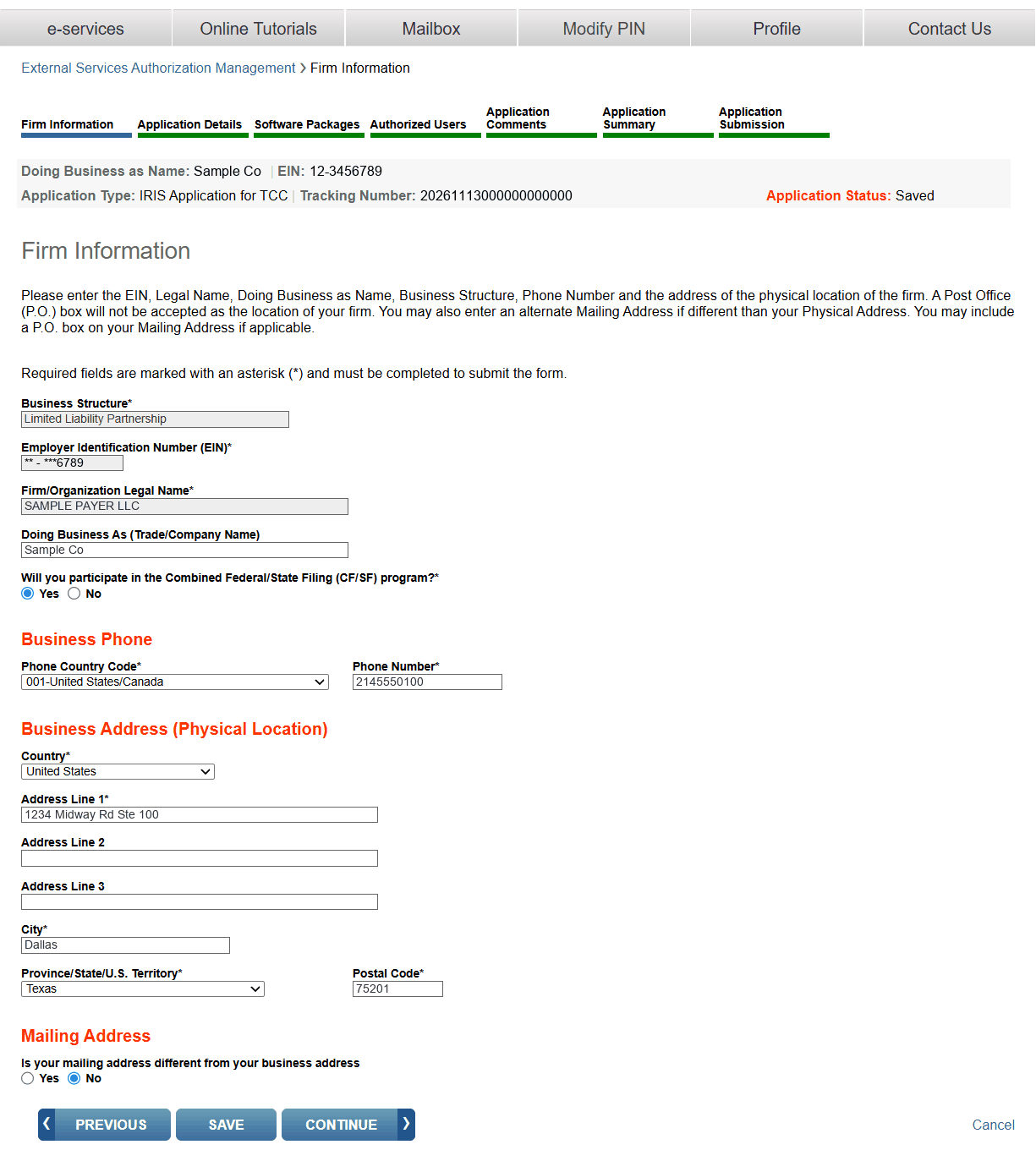
Three things to get right here:
- A street address, not a box. “A Post Office (P.O.) box will not be accepted as the location of your firm.” A P.O. box is allowed only as the separate mailing address.
- Business structure decides how many people you need. Tab 4 requires two Responsible Officials and two Contacts for most structures, and one of each for a sole proprietor, a single-member LLC or an S corporation. Pick the structure that matches how the business is taxed.
- The CF/SF question. The tab asks “Will you participate in the Combined Federal/State Filing (CF/SF) program?” Answer yes if you want the IRS to forward your 1099s to participating states. CF/SF in IRIS explains what that covers.
Tab 2, Application Details: your role, your forms, your method
This is the tab that decides what your TCC can do. You choose a role, then the forms and the transmission method.
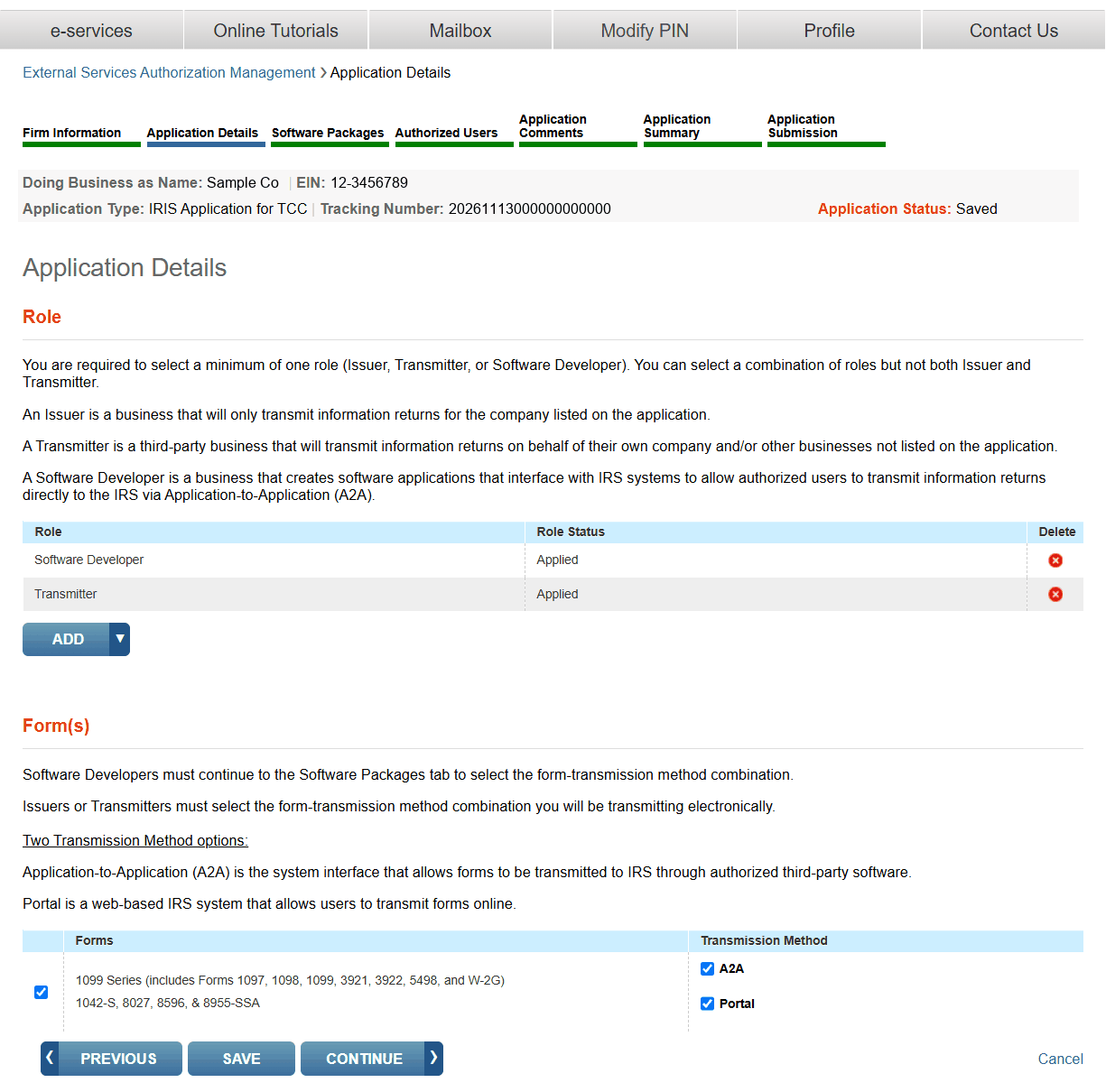
The roles, in the IRS’s words:
| Role | What the screen says | Pick it if |
|---|---|---|
| Issuer | “An Issuer is a business that will only transmit information returns for the company listed on the application.” | You file only your own company’s forms |
| Transmitter | “A Transmitter is a third-party business that will transmit information returns on behalf of their own company and/or other businesses not listed on the application.” | You file for clients, affiliates or any other EIN, with or without your own |
| Software Developer | “A Software Developer is a business that creates software applications that interface with IRS systems” | You write software that sends files to the IRS through A2A |
One rule trips people up: “You can select a combination of roles but not both Issuer and Transmitter.” If you file for anyone besides the company on the application, choose Transmitter. It covers your own forms too.
Then the method. The screen describes the two:
- Portal. “Portal is a web-based IRS system that allows users to transmit forms online.” You key forms in or upload the IRS CSV template. See the Taxpayer Portal, step by step.
- A2A. “Application-to-Application (A2A) is the system interface that allows forms to be transmitted to IRS through authorized third-party software.” This is for XML files sent by software. See the A2A developer guide.
You may tick both. The tutorial says what happens next: “An IRIS TCC will be assigned for each of the roles and transmission methods you select.” A portal TCC and an A2A TCC are separate codes, and one does not work in the other channel.
Most filers stop at two choices. A company that files its own 1099s and uploads a CSV picks Issuer and Portal. An accountant or payroll provider filing for clients picks Transmitter and Portal. Neither needs the Software Developer role or the next tab.
Tab 3, Software Packages: only for software developers
If you did not choose Software Developer, there is nothing to do on this tab. Go on to Authorized Users.
If you did, the application will not let you leave it empty: “If you selected the role of Software Developer without creating a Software Package, you will not be allowed to submit the application.”
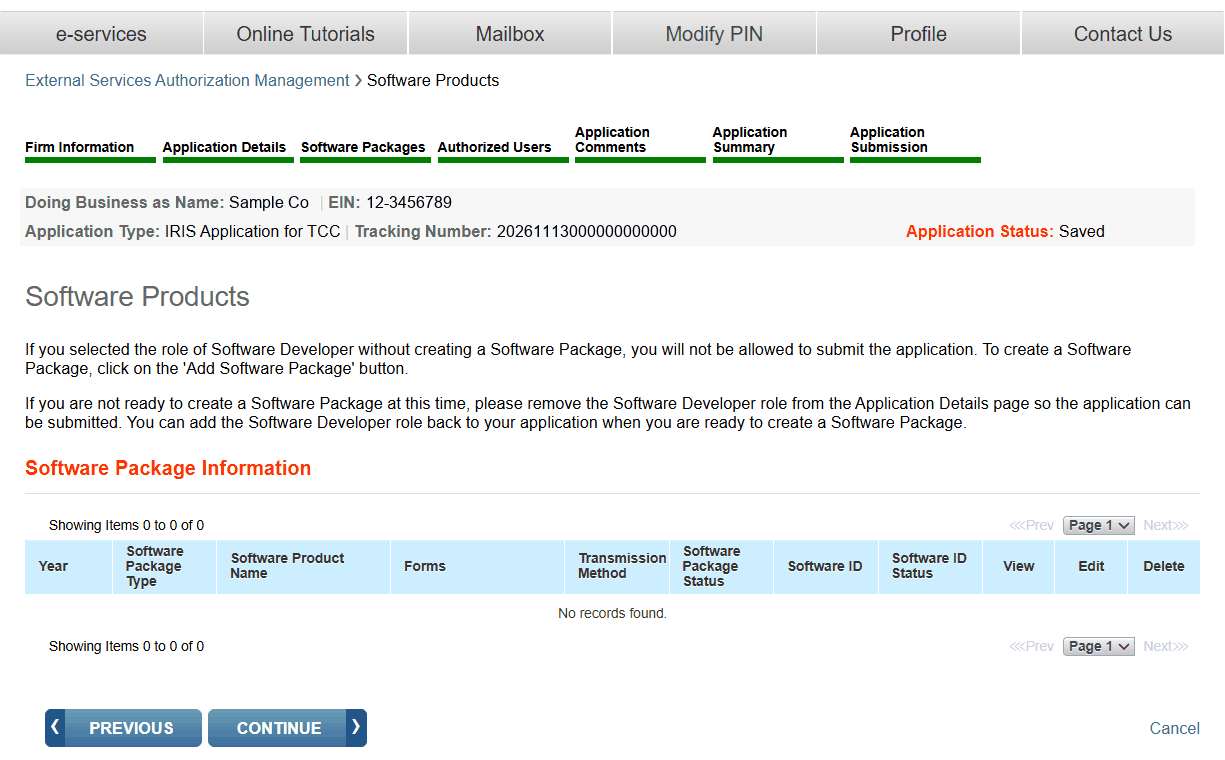
The screen gives the way out if you chose the role too early: “please remove the Software Developer role from the Application Details page so the application can be submitted.” It adds that you can put the role back later, when you have a package to list.
A package is one product for one tax year. The form asks for:
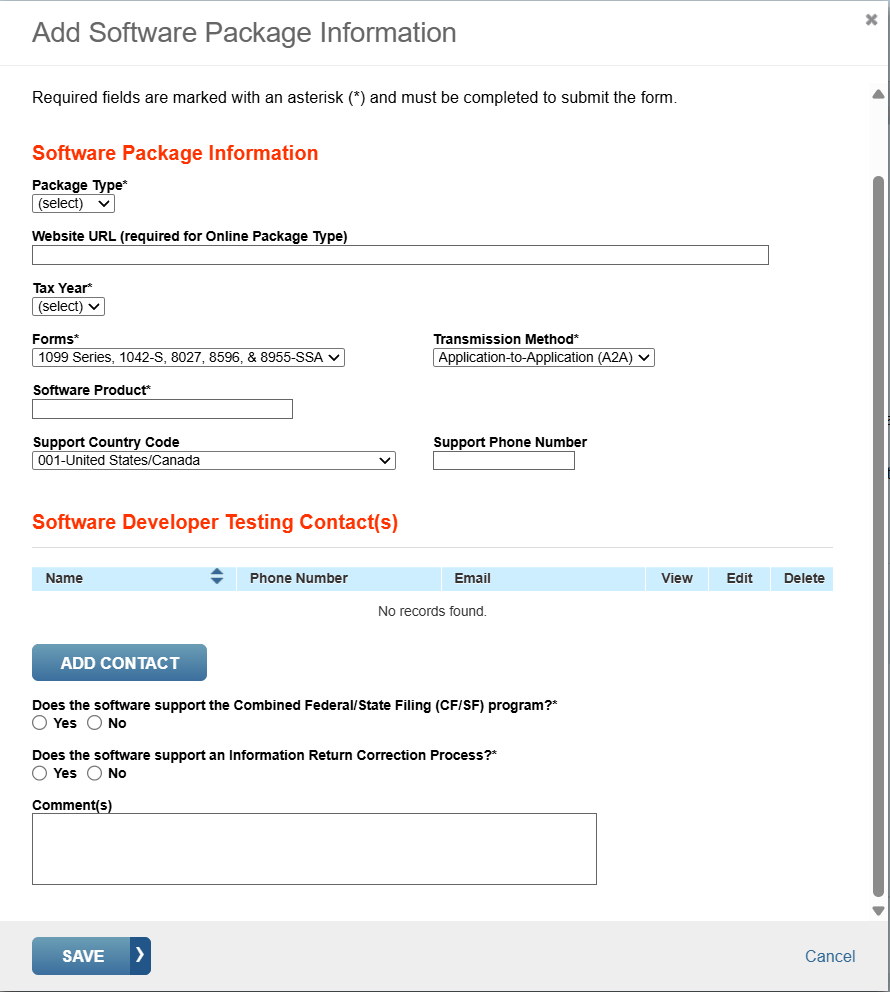
- Package type, and a website address if the type is online
- Tax year, forms and transmission method
- The software product name, and a support phone number
- One or more testing contacts
- Whether the software supports Combined Federal/State Filing
- Whether the software supports corrections
Why would a filer want this role? It is the one that receives the IRIS XML schema package. The IRS sends the schemas only to a TCC with the Software Developer role, or to a government agency (IRIS schemas and business rules). A company that builds its own XML files counts. One of the package types the tutorial lists is the “In-house Package: A software package that is developed within a company solely for in-house use.” The developer TCC is for testing only (Publication 5718), so a company that also files needs an Issuer or Transmitter role as well.
Tab 4, Authorized Users: who has to be on the application
Three kinds of people go on the application, and the minimums are firm.
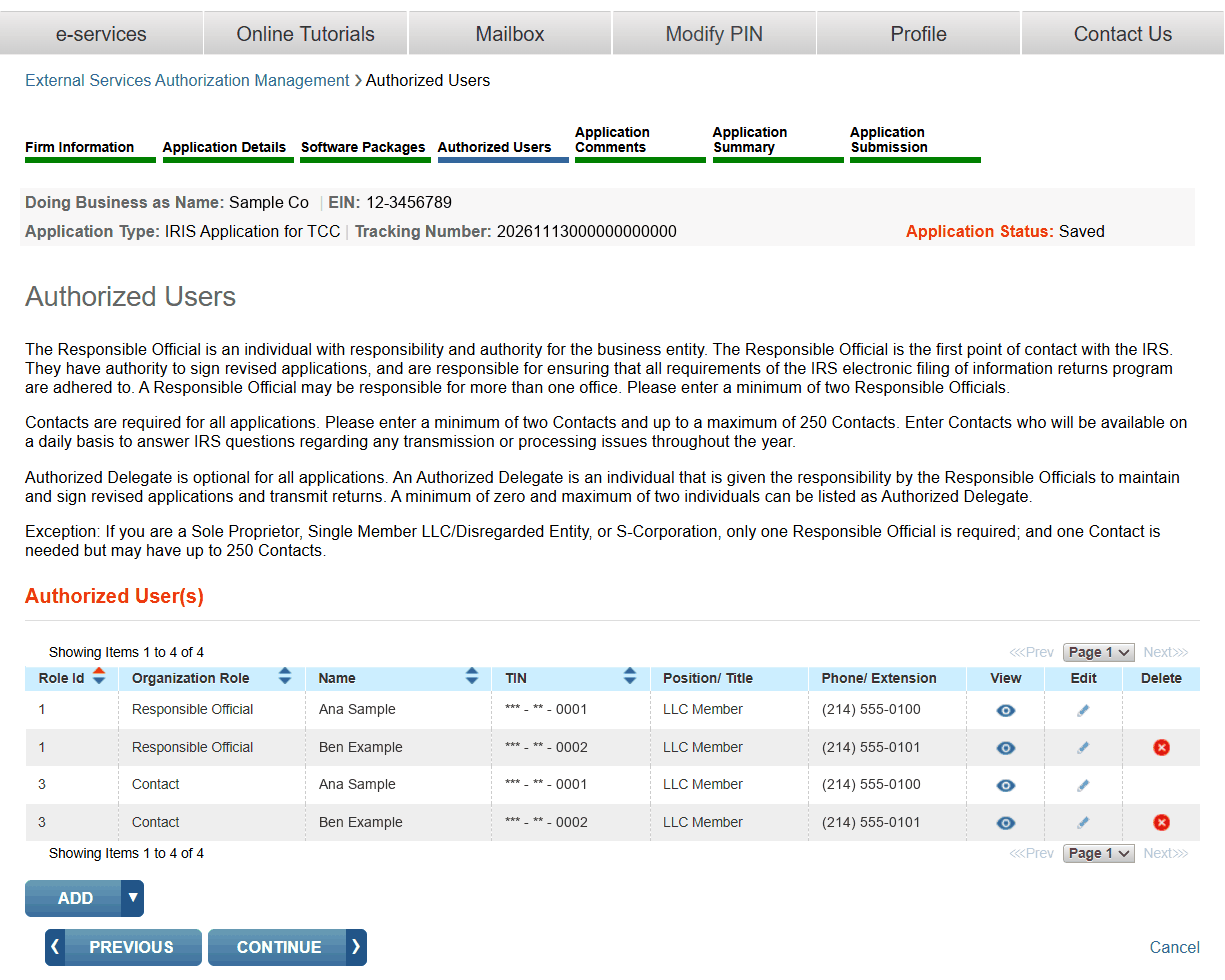
| Role | What the screen says | How many |
|---|---|---|
| Responsible Official | “The Responsible Official is an individual with responsibility and authority for the business entity.” | At least two |
| Contact | “Enter Contacts who will be available on a daily basis to answer IRS questions regarding any transmission or processing issues throughout the year.” | At least two, up to 250 |
| Authorized Delegate | “Authorized Delegate is optional for all applications.” | None, one or two |
Small businesses get a lower minimum: “If you are a Sole Proprietor, Single Member LLC/Disregarded Entity, or S-Corporation, only one Responsible Official is required”, and one Contact.
The same person may be both a Responsible Official and a Contact, which is how a two-person firm meets the two-and-two rule. What matters more is who you name as a Responsible Official, because every one of them has to sign before the IRS looks at the application. Name people who are available now and who can pass IRS identity proofing. For staff outside the United States, see IRS access for offshore and foreign teams.
Tabs 5 to 7: comments, summary and signing
Application Comments is a free-text tab. Application Summary shows everything on one page, and it is worth reading slowly before anyone signs.
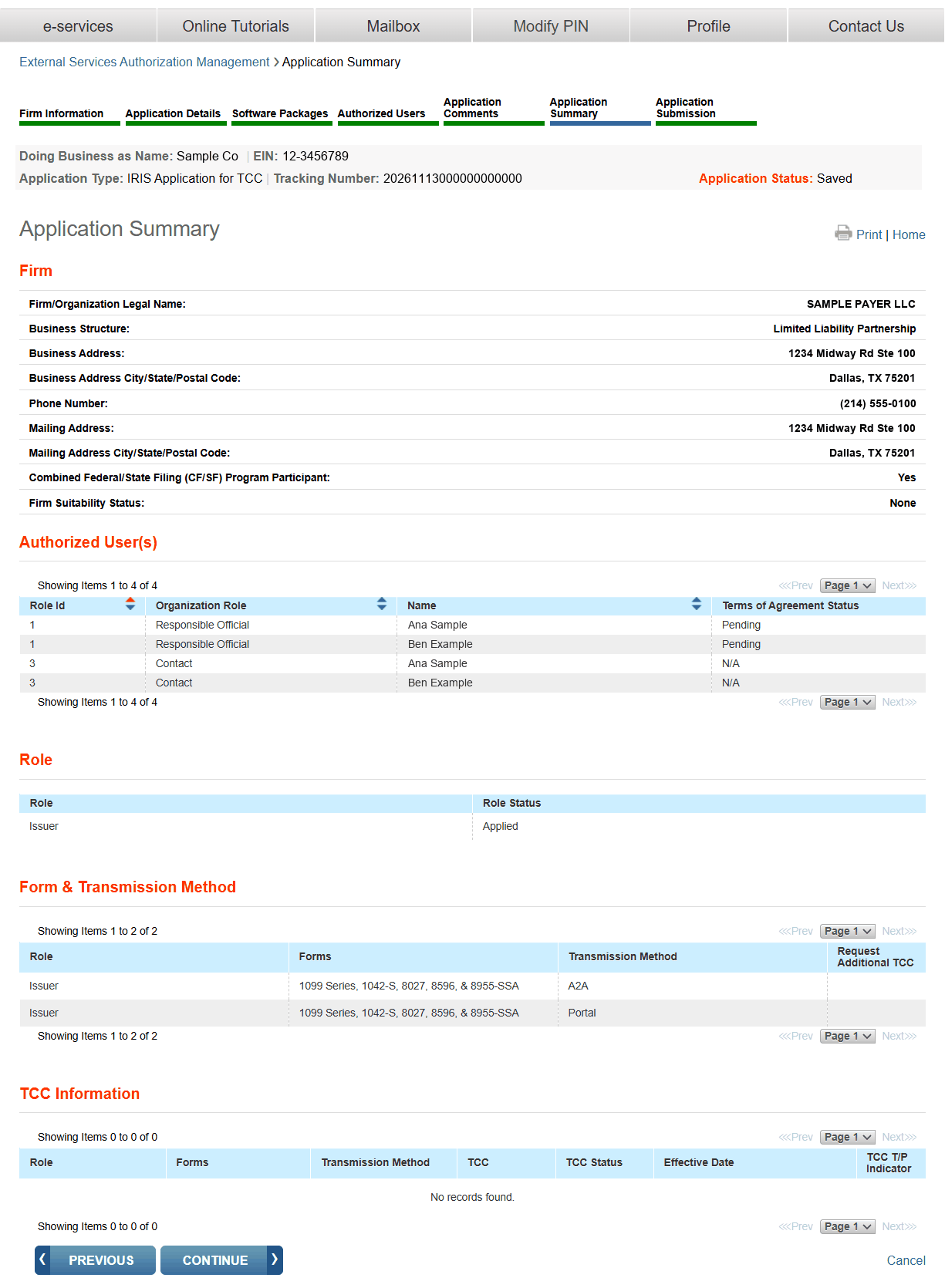
Look at three places on the summary:
- Role. If you removed Software Developer to get past tab 3, or swapped Transmitter for Issuer along the way, this table shows what is left. It is easy to submit with a role you did not mean to keep.
- Form and Transmission Method. One row per method. Both Portal and A2A should be here if you want both.
- Terms of Agreement Status. Each Responsible Official shows Pending until that person signs.
Signing is on the last tab. The terms end with the instruction: “Please enter your PIN to accept the terms for this application.”
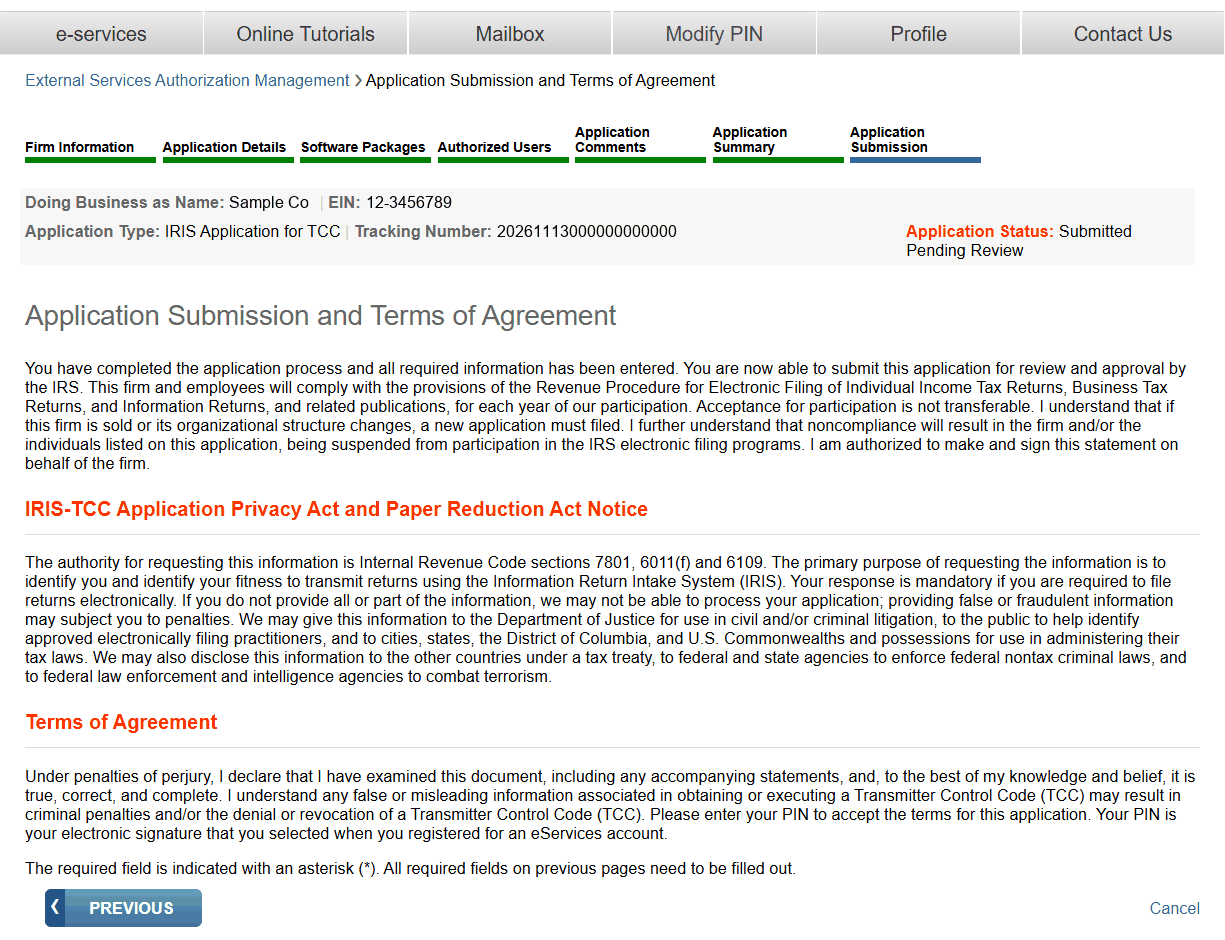
One signature is not enough. The tutorial covers what happens when someone has not signed: “If the application is incomplete due to a missing RO signature, the application will be saved pending signatures” and the status reads Signature Required. Each remaining Responsible Official has to sign in, open the application and enter a PIN. An Authorized Delegate cannot sign a new application.
The terms also say the approval belongs to this firm as it stands: “Acceptance for participation is not transferable.” A sale or a change of structure means a new application.
After you submit: the wait, the TCC and what it unlocks
The status moves in order: Saved while you work, Signature Required if a signature is missing, Submitted Pending Review once everyone has signed, and Completed when the IRS has approved it.
In between, “the IRS will perform checks before assigning TCC(s)”. The tutorial says processing times vary and that a typical application is processed within 45 business days, so an application started in January will not be ready for the January 31 forms. The 2027 deadline list has the dates to work back from.
When it is done, the TCCs appear on the summary tab, one for each role and method. You do not have to wait for paper: “You will be able to view and use your TCC(s) before you receive your TCC Acceptance letter via the United States Postal Service.”
What each code is for:
| You chose | You get | Next step |
|---|---|---|
| Issuer or Transmitter, Portal | A portal TCC | Sign in to the Taxpayer Portal and file |
| Issuer or Transmitter, A2A | An A2A TCC | Register an API Client ID and pass the communication test (A2A guide) |
| Software Developer | A developer TCC, for testing only, and a Software ID for each package | Download the schema package and test in the IRS test system |
The application stays open after approval. Responsible Officials and Authorized Delegates can add a role, a method, a person or a software package later; a Software Developer role removed to get the application through can go back on. Keeping the people on it current is a duty, not a courtesy: the TCC lifecycle guide covers the 30-day update rule and how a TCC is lost.
Questions people ask
Can I use my FIRE TCC in IRIS?
No. The FIRE application, shown as IR-TCC, and the IRIS application, shown as IRIS-TCC, are separate. A firm with a completed FIRE application still has to file the IRIS Application for TCC and wait for new codes.
Should I choose Issuer or Transmitter?
Issuer if you will file only for the company named on the application. Transmitter if you will file for any other business, such as clients or affiliates; it covers your own forms as well. The application does not allow both.
Do I need the Software Developer role?
Not to file. It is for firms that write software sending XML files to the IRS through A2A, including in-house software. It is also the role that receives the IRIS XML schema package. If you select it, you must list at least one software package before the application can be submitted.
Why does my application say Signature Required?
A Responsible Official has not signed. Every Responsible Official on the application has to sign the Application Submission tab with a five-digit PIN before the IRS processes it.
How long does it take to get an IRIS TCC?
IRS Publication 5903 says processing times vary and a typical application is processed within 45 business days. The clock starts when the last Responsible Official signs.
Can I choose both the Taxpayer Portal and A2A?
Yes. Tick both on the Application Details tab. The IRS assigns a separate TCC for each role and transmission method, and a portal TCC does not work for A2A.