The form, box by box: where each box goes in IRIS
Copy A of Form 1099-LS, with the IRIS XML element written at every box and a number that matches the table below. The table adds whether the element is required, its format, the Pub 1220 (FIRE) position the box used to have, and the portal CSV template column it lands in.
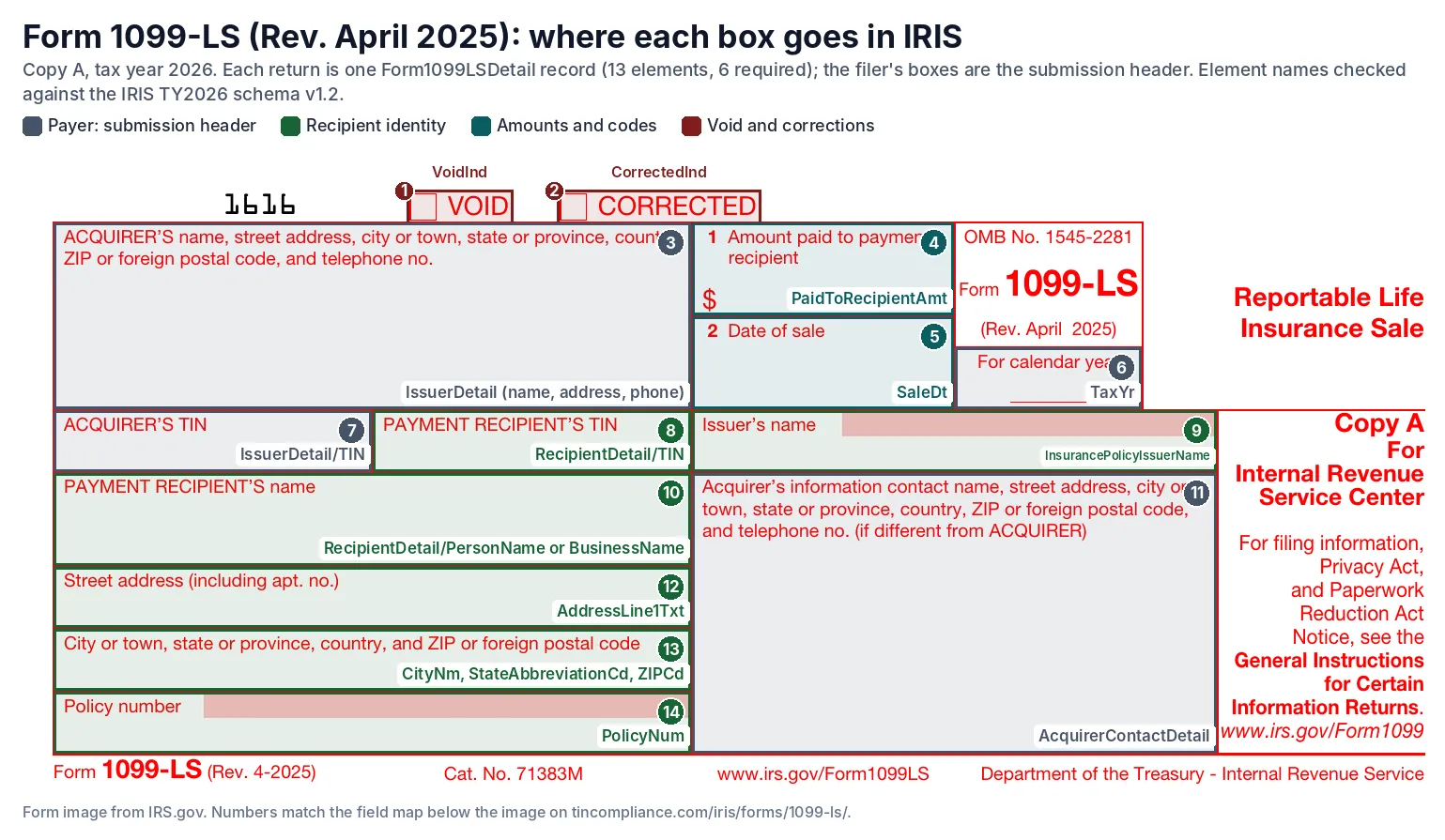 Box 1: VOIDIRIS element
VoidIndRequiredRequired, 1 or 0Pub 1220 (FIRE)None: FIRE has no void recordCSV templateNo column in the TY2025 templateClick to open row 1 in the field mapBox 2: CORRECTEDIRIS elementCorrectedInd, with PrevSubmittedRecRecipientGrp when 1RequiredRequired, 1 or 0Pub 1220 (FIRE)B record 6CSV templateNo column in the TY2025 templateClick to open row 2 in the field mapBox 3: ACQUIRER'S name, street address, city or town, state or province, country,IRIS elementIRSubmission1Header/: BusinessName/ or PersonName, MailingAddressGrp (USAddress or ForeignAddress), PhoneNumRequiredRequired in the headerPub 1220 (FIRE)A record 12-20 (TIN), 53-132 (name), 134-224 (address), 225-239 (phone)CSV templateAcquirer TIN TypeAcquirer Taxpayer ID Number
Acquirer Name Type
Acquirer Business or Entity Name Line 1
Acquirer Business or Entity Name Line 2
Acquirer First Name
Acquirer Middle Name
Acquirer Last Name (Surname)
Acquirer Suffix
Acquirer Country
Acquirer Address Line 1
Acquirer Address Line 2
Acquirer City/Town
Acquirer State/Province/Territory
Acquirer ZIP/Postal Code
Acquirer Phone Type
Acquirer PhoneClick to open row 3 in the field mapBox 4: 1 Amount paid to paymentIRIS element
PaidToRecipientAmtRequiredOptional, amount, 2 decimalsPub 1220 (FIRE)Amount code 1, B record 55-66CSV templateBox 1 - Amount paid to payment recipientClick to open row 4 in the field mapBox 5: 2 Date of saleIRIS elementSaleDtRequiredOptional, date YYYY-MM-DDPub 1220 (FIRE)B record 546-553CSV templateBox 2 - Date of saleClick to open row 5 in the field mapBox 6: For calendar yearIRIS elementTaxYr (also IRSubmission1Header/ and the manifest)RequiredRequired, four-digit yearPub 1220 (FIRE)B record 2-5CSV templateTax YearClick to open row 6 in the field mapBox 7: ACQUIRER'S TINIRIS elementIRSubmission1Header/IssuerDetail/ TIN with TINSubmittedTypeCd (BUSINESS_TIN, INDIVIDUAL_TIN, UNKNOWN)RequiredRequired, 9 digitsPub 1220 (FIRE)A record 12-20CSV templateAcquirer TIN TypeAcquirer Taxpayer ID NumberClick to open row 7 in the field mapBox 8: PAYMENT RECIPIENT'S TINIRIS element
RecipientDetail/ with RecipientDetail/RequiredRequired, 9 digits, no dashesPub 1220 (FIRE)B record 12-20; TIN type 11CSV templatePayment Recipient TIN TypePayment Recipient Taxpayer ID NumberClick to open row 8 in the field mapBox 9: Issuer's nameIRIS element
InsurancePolicyIssuerNameRequiredOptionalPub 1220 (FIRE)None in Pub 1220 (IRIS only)CSV templateIssuer's NameClick to open row 9 in the field mapBox 10: PAYMENT RECIPIENT'S nameIRIS elementRecipientDetail/ (PersonFirstNm, PersonMiddleNm, PersonLastNm, SuffixNm) or RecipientDetail/BusinessName/ BusinessNameLine1Txt and BusinessNameLine2Txt; name control optional; AdditionalRecipientTxt for a second payeeRequiredRequired (one of the two)Pub 1220 (FIRE)B record 288-367; name control 7-10CSV templatePayment Recipient Name TypePayment Recipient Business or Entity Name Line 1
Payment Recipient Business or Entity Name Line 2
Payment Recipient First Name
Payment Recipient Middle Name
Payment Recipient Last Name (Surname)
Payment Recipient SuffixClick to open row 10 in the field mapBox 11: Acquirer's information contact name, street address, city orIRIS element
AcquirerContactDetail (ContactNm, ContactAddressGrp, ContactPhoneNum)RequiredOptionalPub 1220 (FIRE)None in Pub 1220 (IRIS only)CSV templateAcquirer's NameAcquirer's Country
Acquirer's Address Line 1
Acquirer's Address Line 2
Acquirer's City/Town
Acquirer's State/Province/Territory
Acquirer's ZIP/Postal Code
Acquirer's PhoneClick to open row 11 in the field mapBox 12: Street address (including apt. no.)IRIS element
RecipientDetail/MailingAddressGrp/USAddress/ AddressLine1TxtRequiredRequiredPub 1220 (FIRE)B record 368-407CSV templatePayment Recipient Address Line 1Click to open row 12 in the field mapBox 13: City or town, state or province, country, and ZIP or foreign postal codeIRIS elementRecipientDetail/MailingAddressGrp/ USAddress: CityNm, StateAbbreviationCd, ZIPCd (ForeignAddress: CityNm, ProvinceOrStateNm, CountryCd, ForeignPostalCd)RequiredRequiredPub 1220 (FIRE)B record 448-487, 488-489, 490-498CSV templatePayment Recipient CountryPayment Recipient City/Town
Payment Recipient State/Province/Territory
Payment Recipient ZIP/Postal CodeClick to open row 13 in the field mapBox 14: Policy numberIRIS element
PolicyNumRequiredRequired, text up to 30 charactersPub 1220 (FIRE)None in Pub 1220 (IRIS only)CSV templatePolicy NumberClick to open row 14 in the field map
Field map: box by box
Element paths are relative to Form1099LSDetail unless they start with IRSubmission. The grey part of a path is the group; the dark part is the element itself.
| # | Box on the form | IRIS element | Required, format | Pub 1220 (FIRE) | CSV column (TY2025) |
|---|---|---|---|---|---|
| 1 | VOID | Void | Required1 or 0 | None: FIRE has no void record | Not in the template |
| 2 | CORRECTED | Corrected, with Prev when 1 | Required1 or 0 | B record 6 | Not in the template |
| 3 | ACQUIRER'S name, street address, city or town, state or province, country, | IRSubmission1Header/: BusinessName/orPerson, Mailing, Phone | Requiredin the header | A record 12-20 (TIN), 53-132 (name), 134-224 (address), 225-239 (phone) | Acquirer TIN TypeAcquirer Taxpayer ID NumberAcquirer Name Typeand 14 more columnsAcquirer Business or Entity Name Line 1Acquirer Business or Entity Name Line 2Acquirer First NameAcquirer Middle NameAcquirer Last Name (Surname)Acquirer SuffixAcquirer CountryAcquirer Address Line 1Acquirer Address Line 2Acquirer City/ |
| 4 | 1 Amount paid to payment | Paid | OptionalAmount, 2 decimals | Amount code 1, B record 55-66 | Box 1 - Amount paid to payment recipient |
| 5 | 2 Date of sale | Sale | OptionalDate YYYY-MM-DD | B record 546-553 | Box 2 - Date of sale |
| 6 | For calendar year | TaxAlso in IRSubmission1Header/ and the manifest | RequiredFour-digit year | B record 2-5 | Tax Year |
| 7 | ACQUIRER'S TIN | IRSubmission1Header/ with TINSubmitted (BUSINESS_TIN, INDIVIDUAL_TIN, UNKNOWN) | Required9 digits | A record 12-20 | Acquirer TIN TypeAcquirer Taxpayer ID Number |
| 8 | PAYMENT RECIPIENT'S TIN | RecipientDetail/ with RecipientDetail/ | Required9 digits, no dashes | B record 12-20; TIN type 11 | Payment Recipient TIN TypePayment Recipient Taxpayer ID Number |
| 9 | Issuer's name | Insurance | Optional | None in Pub 1220 (IRIS only) | Issuer's Name |
| 10 | PAYMENT RECIPIENT'S name | RecipientDetail/orRecipientDetail/Name control optional | Required(one of the two) | B record 288-367; name control 7-10 | Payment Recipient Name TypePayment Recipient Business or Entity Name Line 1Payment Recipient Business or Entity Name Line 2and 4 more columnsPayment Recipient First NamePayment Recipient Middle NamePayment Recipient Last Name (Surname)Payment Recipient Suffix |
| 11 | Acquirer's information contact name, street address, city or | Acquirer (Contact, Contact, Contact) | Optional | None in Pub 1220 (IRIS only) | Acquirer's NameAcquirer's CountryAcquirer's Address Line 1and 5 more columnsAcquirer's Address Line 2Acquirer's City/ |
| 12 | Street address (including apt. no.) | RecipientDetail/ | Required | B record 368-407 | Payment Recipient Address Line 1 |
| 13 | City or town, state or province, country, and ZIP or foreign postal code | RecipientDetail/: City, State, ZIPCd (or Foreign) | Required | B record 448-487, 488-489, 490-498 | Payment Recipient CountryPayment Recipient City/ |
| 14 | Policy number | Policy | RequiredText up to 30 characters | None in Pub 1220 (IRIS only) | Policy Number |
Elements with no box on the form
| IRIS element | Required, format | Pub 1220 (FIRE) | |
|---|---|---|---|
Record | RequiredWhole number up to 8 digits | B record 500-507 (sequence number; not the same thing) | |
Issuer | OptionalExactly 4 characters | B record 41-44 | |
Recipient | OptionalText up to 30 characters | B record 21-40 |
Notes
- Path:
IRTransmission,IRSubmission1Grp,IRSubmission1Detail,Form1099LSDetail(one per return). The filer (payer, lender, trustee or issuer) appears once, in the submission header, not in each return.
Form 1099-LS business rules
Form 1099-LS has 1 business rule of its own in the tax year 2026 rule set. What the severity means:
- Report error, reject over threshold Each failing record is accepted with errors, until the share of failing records passes a threshold the IRS does not publish. Then the whole submission is rejected.
| Rule | Severity | What it checks |
|---|---|---|
F1099LS001 | Report error, reject over threshold | The amount paid to the payment recipient must be more than zero. |
The descriptions are our own summaries; your IRIS acknowledgment gives the rule number. IRIS also checks the rules every form shares, such as SHAREDIRFORM014 (payee name and TIN), listed on the rules every form shares page.
Every element of Form1099LSDetail, in schema order
IRTransmission › IRSubmission1Grp › IRSubmission1Detail › Form1099LSDetailEach Form 1099-LS return is one Form1099LSDetail record in a submission of group 1. The table lists all 13 elements in schema order for tax year 2026, including the ones with no box on the form: whether each is required, and the format IRIS accepts. Element names are the ones the IRS uses in its IRIS ATS examples and Publication 5718; the IRS revises the schema each year. A FIRE filer converting a Pub 1220 file finds the field-by-field mapping in the Pub 1220 to IRIS crosswalk.
| Element | Required | Format |
|---|---|---|
TaxYr | Required | Four-digit year |
RecordId | Required | Whole number, up to 8 digits |
IssuerOfficeCd | Optional | Exactly 4 characters |
VoidInd | Required | 1 (yes) or 0 (no) |
CorrectedInd | Required | 1 (yes) or 0 (no) |
PrevSubmittedRecRecipientGrp | Optional | Group of elements |
OtherIntakeSystemInd | Required in the group | 1 (yes) or 0 (no) (1 when the original was filed outside IRIS) |
OtherIntakeSystemNm | Optional | Group of elements (FIRE, for example) |
UniqueRecordId | Optional | (the IRIS original's record ID) |
TIN | Optional | 9 digits, no dashes (original payee TIN) |
PersonName | Required in the group | Group of elements (original payee name (or BusinessName)) |
BusinessName | Required in the group | Group of elements |
RecipientDetail | Required | Group of elements |
RecipientAccountNum | Optional | Text, up to 30 characters |
PolicyNum | Required | Text, up to 30 characters |
PaidToRecipientAmt | Optional | Amount, zero or more, up to 2 decimal places |
SaleDt | Optional | Date, YYYY-MM-DD |
InsurancePolicyIssuerName | Optional | Group of elements |
AcquirerContactDetail | Optional | Group of elements |
ContactNm | Optional | Text, up to 35 characters |
ContactAddressGrp | Optional | Group of elements (USAddress or ForeignAddress) |
ContactPhoneNum | Optional | Text, up to 30 characters |
CSV template columns: the IRIS Taxpayer Portal upload
The portal takes Form 1099-LS as a CSV upload built on the IRS template for the form. The tax year 2025 template has 48 columns (17 required); the IRS has not published tax year 2026 templates, and a template is tied to its tax year. The column letter is the spreadsheet column and the format is from the IRS Template Formatting Guidelines; the IRIS element behind each box is in the field map above. Download a sample 1099-LS CSV with two fictitious records in this layout, for seeing the shape of the file, not for uploading; check a real file with the IRIS CSV upload checker.
| Col. | Template column | Required | Format |
|---|---|---|---|
| A | Form Type | Optional | form type, filled in by the template |
| B | Tax Year | Optional | tax year |
| C | Acquirer TIN Type | Required | TIN type: EIN, SSN |
| D | Acquirer Taxpayer ID Number | Required | TIN with dashes (XX-XXXXXXX or XXX-XX-XXXX) |
| E | Acquirer Name Type | Required | B (business) or I (individual): B, I |
| F | Acquirer Business or Entity Name Line 1 | Required | text; up to 40 characters |
| G | Acquirer Business or Entity Name Line 2 | Optional | text; up to 40 characters |
| H | Acquirer First Name | Optional | text; up to 20 characters |
| I | Acquirer Middle Name | Optional | text; up to 20 characters |
| J | Acquirer Last Name (Surname) | Optional | text; up to 20 characters |
| K | Acquirer Suffix | Optional | text; up to 20 characters |
| L | Acquirer Country | Required | country code (US for United States) |
| M | Acquirer Address Line 1 | Required | text; up to 35 characters |
| N | Acquirer Address Line 2 | Optional | text; up to 35 characters |
| O | Acquirer City/Town | Required | text; up to 40 characters |
| P | Acquirer State/Province/Territory | Required | two-letter state (or province, up to 17 characters); up to 17 characters |
| Q | Acquirer ZIP/Postal Code | Required | ZIP: exactly 5, 9 or 12 digits for a U.S. address, no dash; up to 9 characters |
| R | Acquirer Phone Type | Optional | D (domestic) or I (international): D, I |
| S | Acquirer Phone | Optional | phone, 10 digits |
| T | Payment Recipient TIN Type | Optional | TIN type: ATIN, EIN, ITIN, QI-EIN, SSN, UND |
| U | Payment Recipient Taxpayer ID Number | Optional | TIN with dashes (XX-XXXXXXX or XXX-XX-XXXX) |
| V | Payment Recipient Name Type | Required | B (business) or I (individual): B, I |
| W | Payment Recipient Business or Entity Name Line 1 | Optional | text; up to 40 characters |
| X | Payment Recipient Business or Entity Name Line 2 | Optional | text; up to 40 characters |
| Y | Payment Recipient First Name | Optional | text; up to 20 characters |
| Z | Payment Recipient Middle Name | Optional | text; up to 20 characters |
| AA | Payment Recipient Last Name (Surname) | Optional | text; up to 20 characters |
| AB | Payment Recipient Suffix | Optional | text; up to 20 characters |
| AC | Payment Recipient Country | Required | country code (US for United States) |
| AD | Payment Recipient Address Line 1 | Required | text; up to 35 characters |
| AE | Payment Recipient Address Line 2 | Optional | text; up to 35 characters |
| AF | Payment Recipient City/Town | Required | text; up to 40 characters |
| AG | Payment Recipient State/Province/Territory | Required | two-letter state (or province, up to 17 characters); up to 17 characters |
| AH | Payment Recipient ZIP/Postal Code | Required | ZIP: exactly 5, 9 or 12 digits for a U.S. address, no dash; up to 9 characters |
| AI | Office Code | Optional | 4 characters |
| AJ | Policy Number | Required | text; up to 30 characters |
| AK | Box 1 - Amount paid to payment recipient | Optional | amount, no $ or commas |
| AL | Box 2 - Date of sale | Optional | MM/DD/YYYY |
| AM | Issuer's Name | Required | text; up to 75 characters |
| AN | Acquirer's Name | Optional | text; up to 35 characters |
| AO | Acquirer's Country | Optional | country code (US for United States) |
| AP | Acquirer's Address Line 1 | Optional | text; up to 35 characters |
| AQ | Acquirer's Address Line 2 | Optional | text; up to 35 characters |
| AR | Acquirer's City/Town | Optional | text; up to 40 characters |
| AS | Acquirer's State/Province/Territory | Optional | two-letter state (or province, up to 17 characters); up to 2 characters |
| AT | Acquirer's ZIP/Postal Code | Optional | ZIP: exactly 5, 9 or 12 digits for a U.S. address, no dash; up to 9 characters |
| AU | Domestic or International Acquirer's Phone Number | Optional | D (domestic) or I (international): D, I |
| AV | Acquirer's Phone | Optional | phone, 10 digits |
Check a file before you send it. TIN Comply's free IRIS 1099 File Checker runs an IRIS XML or CSV file against the IRS business rules in your browser.